
Employee Preparedness Benefit
Give employees practical support for personal crises that affect work, family, and peace of mind.
The Personal Continuity Planning™ (PCP) System helps employees organize critical information, prepare for family disasters, and make legacy and end-of-life decisions through one self-paced, privacy-conscious program.
Employers provide access. Employees complete and control their own planning files in the Personal Continuity Vault™ (PCV™).
No phone number required. See the system, sample resources, privacy model, and pilot options.
Are you a private individual looking for yourself or your family? For Individuals & Families →
Why employers offer it
“A prepared employee comes back to work more quickly.”
That’s the premise and value to employers who offer our crisis preparation resources to their employees. Whether it’s a one-off event that happens to one of your team members, like a home fire or hacker, or a community-wide disaster like a flash flood or “hurrinado”, you want your employees to be prepared for life’s crises.
When an accident, natural disaster, or hacking incident occurs, you want your people to be able to recover quickly, take care of their personal situations and families, and then be able to come back to work. Providing disaster preparation templates, checklists, workbooks and guidance will help each team member take responsibility to “be prepared”.
Why organizations offer PCP
A practical benefit designed for employees, and manageable for HR
Practical employee support
Give employees a structured way to prepare before an emergency, major life event, or family transition.
Low administrative burden
One private join link for HR to share. Employees claim their own access, and self-paced participation means nothing for HR to run week to week.
Clear personal-data boundaries
BePrepared.biz does not collect or store the personal information employees enter into their planning files.
Fits your benefits strategy
Our resources are offered within your organization’s benefits strategy, usually as an add-on benefit like financial planning, mindfulness, or wellness programs.
Sized to your organization
The corporate program is customized to your organization’s size, needs, and budget.
Your name/logo on the access link
We can customize your access link with your organization’s logo and provide additional customization as needed. Ask us what is available.
What your people are up against
Unexpected threats land on employees every day.
Most of them happen away from work. All of them follow your people back to work.

Disasters
Earthquake, fire, flood, hurricane, tornado

Health crisis
Heart attack, stroke, seizure, memory loss

Accidents
Car crash, fall from ladder or roof, sports injury

Technology
Computer crash, loss of device, loss of photos

Attacks
Cyberattack, virus, blackout, theft
What employees gain
Core Benefits
What being prepared gives your people, and why it matters to your organization.

Gain peace of mind
Critical information and important documents organized and protected.

Protect the family
Prepare for potential disasters, develop strategies, and gather supplies.

Recover quickly
When crises do happen, get back to normal life, and back to work, as soon as possible.
One system. Three connected phases.
Employees can start with the need that matters most and continue at their own pace.
-
Phase 1
Critical Information & Important Documents
Help employees organize essential contacts, accounts, documents, and instructions their household may need during a crisis.
-
Phase 2
Disaster Scenarios, Strategies & Supplies
Practical guidance for the Big Five natural disasters (earthquake, flood, hurricane, tornado, wildfire), plus a 72-hour supplies checklist.
-
Phase 3
Legacy & End-of-Life Planning
Guide the issues, decisions and instructions Self-Planners and Survivors/Helpers face before and after death.
See what employees receive
The Personal Continuity Vault™ (PCV™)
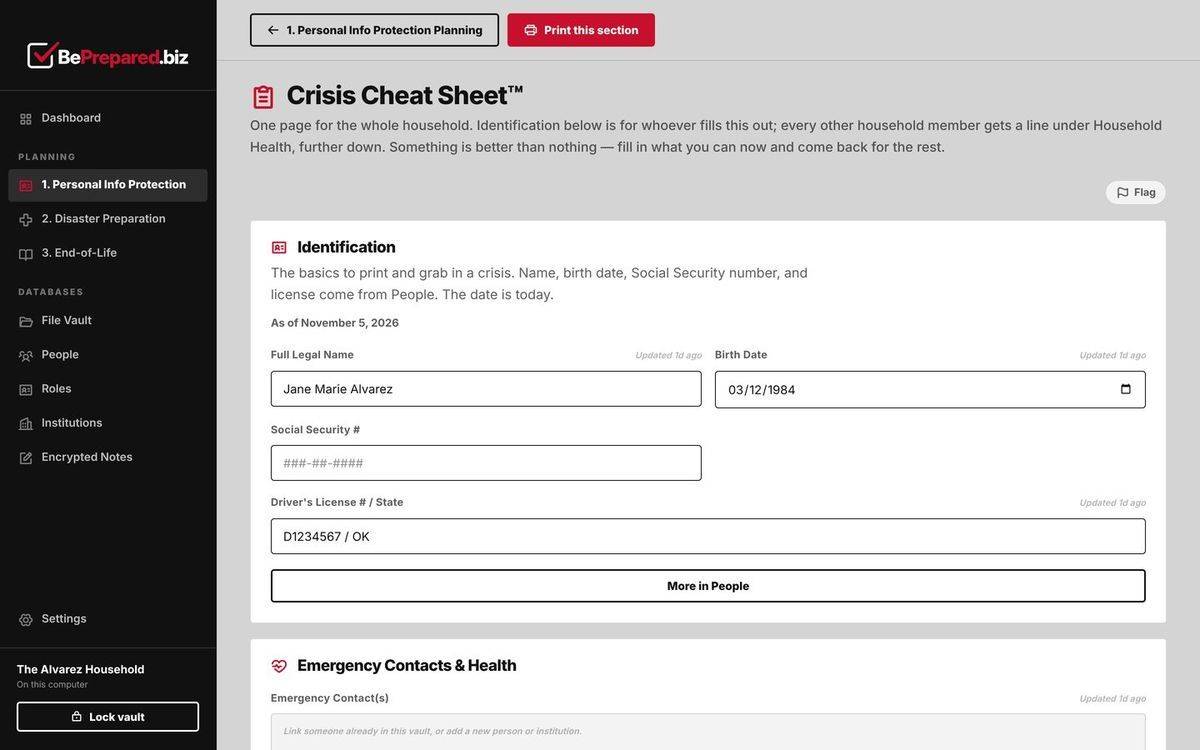
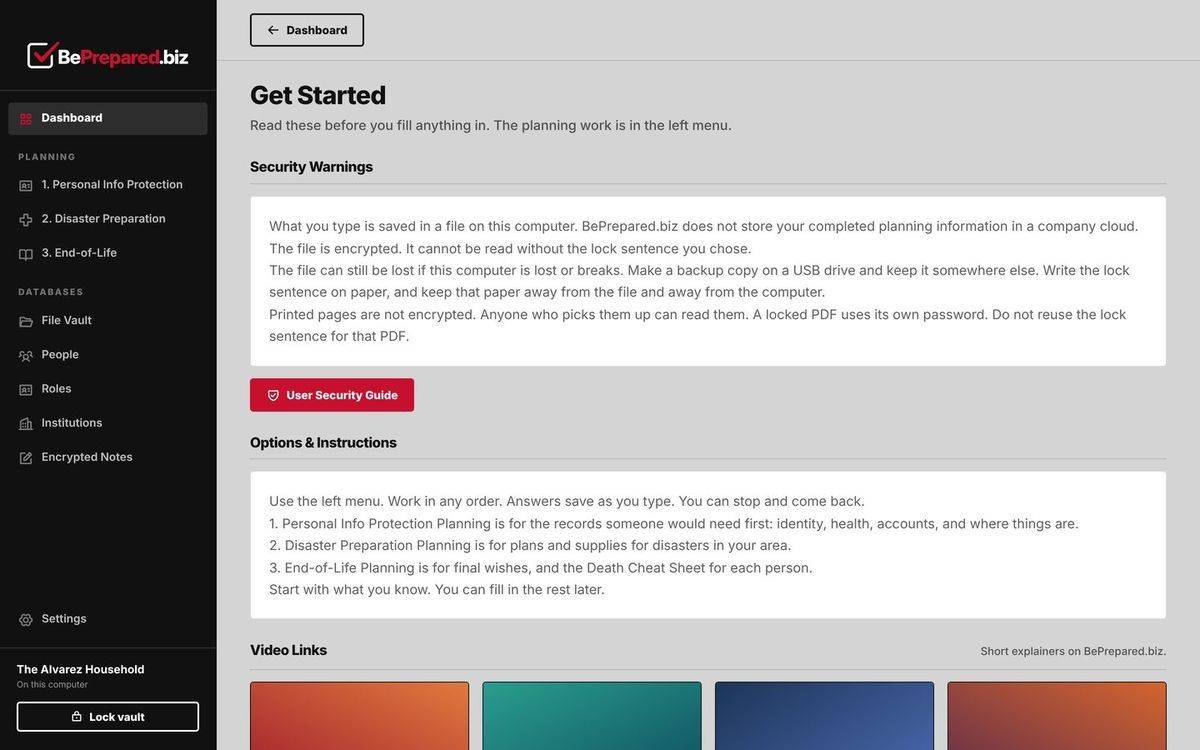
Every employee gets the PCV: a desktop app where guided workbooks, checklists and trackers live in one encrypted vault on their own computer. Employers provide access. Employees keep their files, and only they can open them.
An encrypted vault
One encrypted file on the employee’s own computer. Lock it with one click.
Three connected phases
Information, disasters, and end-of-life planning, each with quick starts and deeper workbooks.
Everything in one place
A file vault, people, roles, institutions and encrypted notes, ready when a household needs them.
Mac, Windows and Linux
A desktop app that employees install once on their own devices and activate with their own key.
Specs at a glance
- Platforms
- Desktop app for macOS, Windows and Linux. Phones and tablets are not supported yet.
- Where data lives
- One encrypted vault file on the employee’s own device. Planning content is never stored in BePrepared.biz’s cloud.
- Unlocking
- A lock sentence, a passphrase of ordinary words that only the employee knows.
- Activation
- A personal activation key sent by email. Each key works on up to 5 of the employee’s own computers.
- Built-in records
- File Vault, People, Roles, Institutions and Encrypted Notes.
- Sharing and backup
- Locked PDF export, plus backup and restore of the vault.
- Auto-lock
- The vault locks itself when it is not in use, or with one click.
- Employer visibility
- None. Employers never see the information employees enter.
Screenshots are from the PCV™ app, filled in with a sample household.
See representative samples in the Corporate Preview Packet →
How organizations use PCP
One pool, one private link, and employees take it from there
01
Choose your pool
Tell us how many people to cover. We size a license pool to your headcount and set it up as soon as payment is received.
02
Get your private join link
We give your HR team one private web address to drop into an email, a benefits portal, or an onboarding packet.
03
Employees claim their own access
Each person opens the link, enters a personal email address, and receives their own activation key by email. One person, one seat.
04
Employees prepare privately
They install the PCV desktop app, activate it once, and build their plan in an encrypted vault on their own personal devices.
Renewals and departures. Renew the pool and everyone’s access is extended at once. When someone leaves, we remove them from the pool: their seat frees up and their key stops working at its next check. Their files stay theirs, on their own computer.
Privacy statement: BePrepared.biz stores the account and access information needed to provide the service: your pool, and each person’s email address and activation. It does not collect or store the personal information employees enter into their planning files. Employers do NOT have access to employees’ completed files.
Evaluate PCP without scheduling a sales call
Get a concise Corporate Preview Packet for HR, benefits, wellness, and organizational leaders
Review the system, employee experience, privacy model, and rollout options on your own schedule.
- Executive overview of the employee need and PCP approach
- One-page map of the three-phase system
- Representative sample pages from each phase
- What employees see, complete, and control
- Clear privacy and data-boundary explanation
- Pilot and broader rollout options
Frequently asked questions
Can our organization see what employees complete?
No. Employers do NOT have access to employees' completed files, and BePrepared.biz does not collect or store the personal information employees enter into their planning files. Those files stay in an encrypted vault on the employee's own device.
How do employees get access?
Once your license pool is set up, we give your HR team one private join link. Share it however you reach your people. Each employee opens it, enters a personal email address, and receives their own activation key by email. They then install the PCV (Personal Continuity Vault) desktop app and activate it once.
What does this cost our organization?
Pricing is based on the number of people covered and is typically structured as an annual sponsorship, similar to an EAP or wellness benefit. Companies pay by check or invoice, and we set up your license pool when payment is received. Request the Corporate Preview Packet for current pricing and a sample rollout timeline.
How long does it take to roll out to our team?
Most organizations are rolling out within two to three weeks. After that, you are live as soon as you share the join link. Employees install the PCV (Personal Continuity Vault) desktop app for macOS, Windows or Linux; phones and tablets are not supported yet.
Is this only for individuals, or can employees use it for their families too?
The same three-phase PCP system works for households as well as organizations. Employees can use their access to build a plan for their entire family, not just themselves. Each key works on up to 5 of that person's computers.
What happens to an employee's access if they leave the company?
Completed files belong to the employee and are saved on their own computer, not on BePrepared.biz or company servers, so nothing is lost when employment ends. When someone leaves, we remove them from your pool: their seat frees up and their key stops working at its next check. They can only get access again through a link your organization still allows.
What happens when our pool renews, or ends?
Renewing the pool extends everyone's access at once. If a pool ends, no one new can join and access ends for everyone in it at their next check. Employees keep their own files either way.